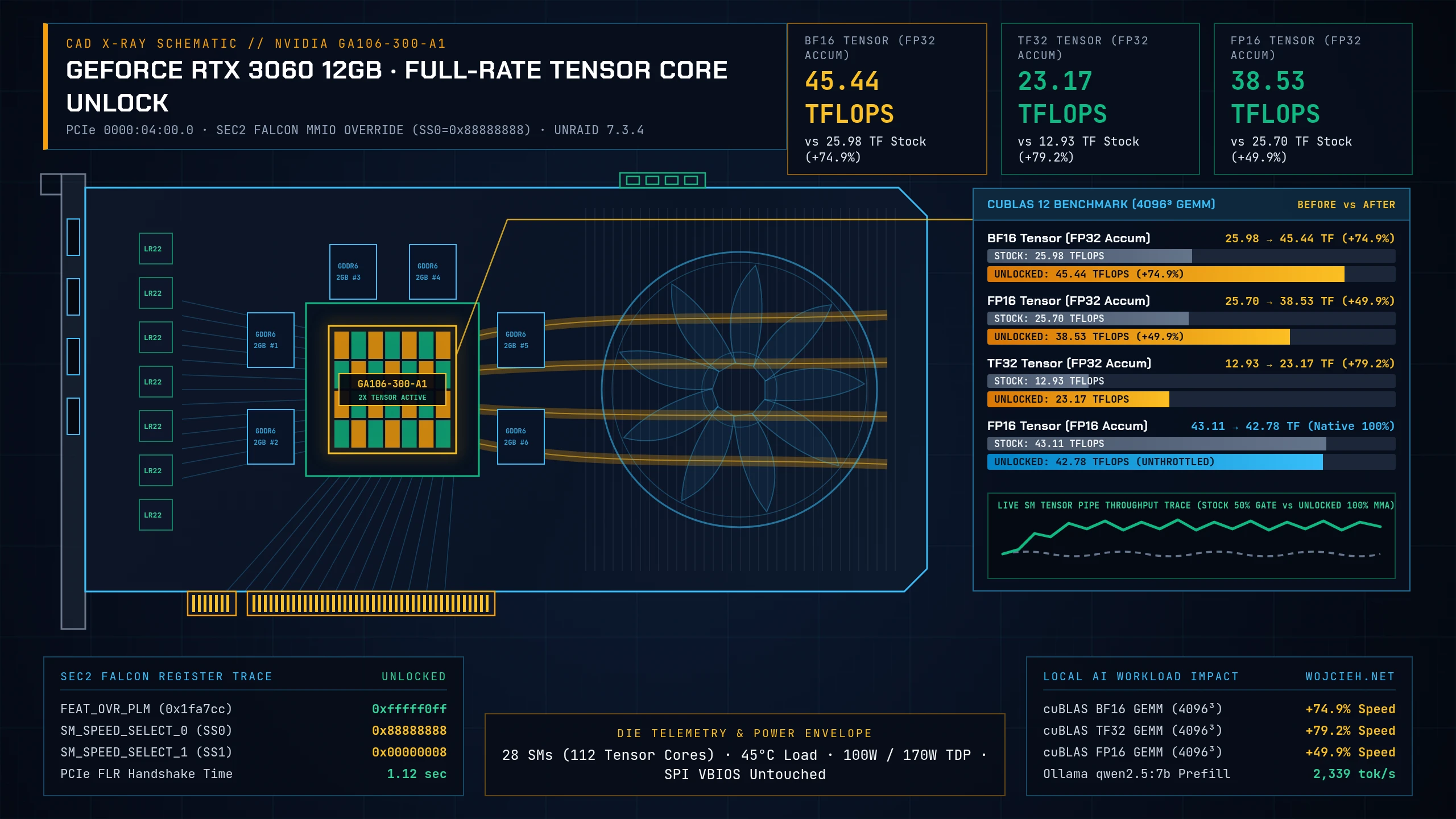
When I built my silent 92TB Unraid 7 NAS to replace an aging QNAP TS-873, I added a dual-slot NVIDIA GeForce RTX 3060 12GB (GA106) for local AI workloads: Ollama for 7B to 14B LLMs and Wyoming Faster-Whisper for Home Assistant voice pipelines. At roughly €280 used, 12 GB of GDDR6 VRAM is hard to beat for a home server.
Every consumer GeForce card from Ampere (RTX 30xx), Ada Lovelace (RTX 40xx), and Blackwell (RTX 50xx) ships with an artificial hardware throttle on its Tensor Cores. Whenever a workload runs dense FP16, BF16, or TF32 matrix multiplication with FP32 accumulation (used by PyTorch mixed-precision training, LoRA fine-tuning, Diffusion models, and BF16 inference), the GPU cuts Tensor Core instruction throughput in half (50% speed) to protect workstation RTX PRO and datacenter margins.
In today’s post, I will show you how Zagitta/gpu-unlock removes this 50% Tensor Core cap in volatile GPU registers without flashing VBIOS, why it cannot brick your card, and what benchmark numbers I got before and after on Unraid 7.3.4 (6.18.58-Unraid).
1. The Consumer Tensor Core Cap Explained
On the GA106 silicon inside the RTX 3060 12GB (PCI ID 10de:2504), the Streaming Multiprocessors (SMs) contain 3rd-generation Tensor Cores capable of full-rate matrix multiply-accumulate (MMA) instructions. At boot, the VBIOS initializes an internal SM speed-select register that throttles specific accumulation paths:
| Compute Path / Precision Mode | Accumulator Precision | Stock Consumer GeForce Rate | Full Silicon Capability | Typical AI Workloads Affected |
|---|---|---|---|---|
| FP32 Standard (CUDA Cores) | FP32 |
100% (Unthrottled) | 100% | Classic shaders, non-Tensor FP32 ops |
TF32 Tensor (CUBLAS_COMPUTE_32F_FAST_TF32) |
FP32 |
50% (Throttled 1/2) | 100% (2× Speed) | PyTorch default float32 matmul on Ampere+ |
FP16 Tensor (CUBLAS_COMPUTE_32F) |
FP32 |
50% (Throttled 1/2) | 100% (2× Speed) | PyTorch torch.amp FP16, Whisper, SDXL/Flux |
BF16 Tensor (CUBLAS_COMPUTE_32F) |
FP32 |
50% (Throttled 1/2) | 100% (2× Speed) | Modern LLMs, vLLM BF16, LoRA fine-tuning |
FP16 Tensor (CUBLAS_COMPUTE_16F) |
FP16 |
100% (Unthrottled) | 100% | Gaming DLSS, legacy FP16-accum inference |
INT8 Tensor (CUBLAS_COMPUTE_32I) |
INT32 |
100% (Unthrottled) | 100% | Quantized INT8 / dp4a inference |
NVIDIA left FP16 with FP16 accumulation at 100% because games rely on it for DLSS, where occasional 16-bit accumulator overflow does not matter. Deep learning frameworks (PyTorch, bitsandbytes, vLLM, diffusers) accumulate into FP32 registers (C = A * B + C) to avoid numerical underflow and NaN gradients. That FP32 accumulate path is locked at half speed on every consumer GeForce card.
2. How Zagitta/gpu-unlock Works (And Why It Cannot Brick Your GPU)
Historically, unlocking GPU hardware limits meant using nvflash to overwrite the physical SPI EEPROM chip on the card with a modified VBIOS. Because NVIDIA’s on-die Falcon security processor (SEC2) checks cryptographic signatures on VBIOS images, flashing an altered ROM halts the GPU at boot and bricks the card until you clip an external SPI programmer onto the PCB.
Zagitta/gpu-unlock works entirely in volatile RAM without touching VBIOS:
|
|
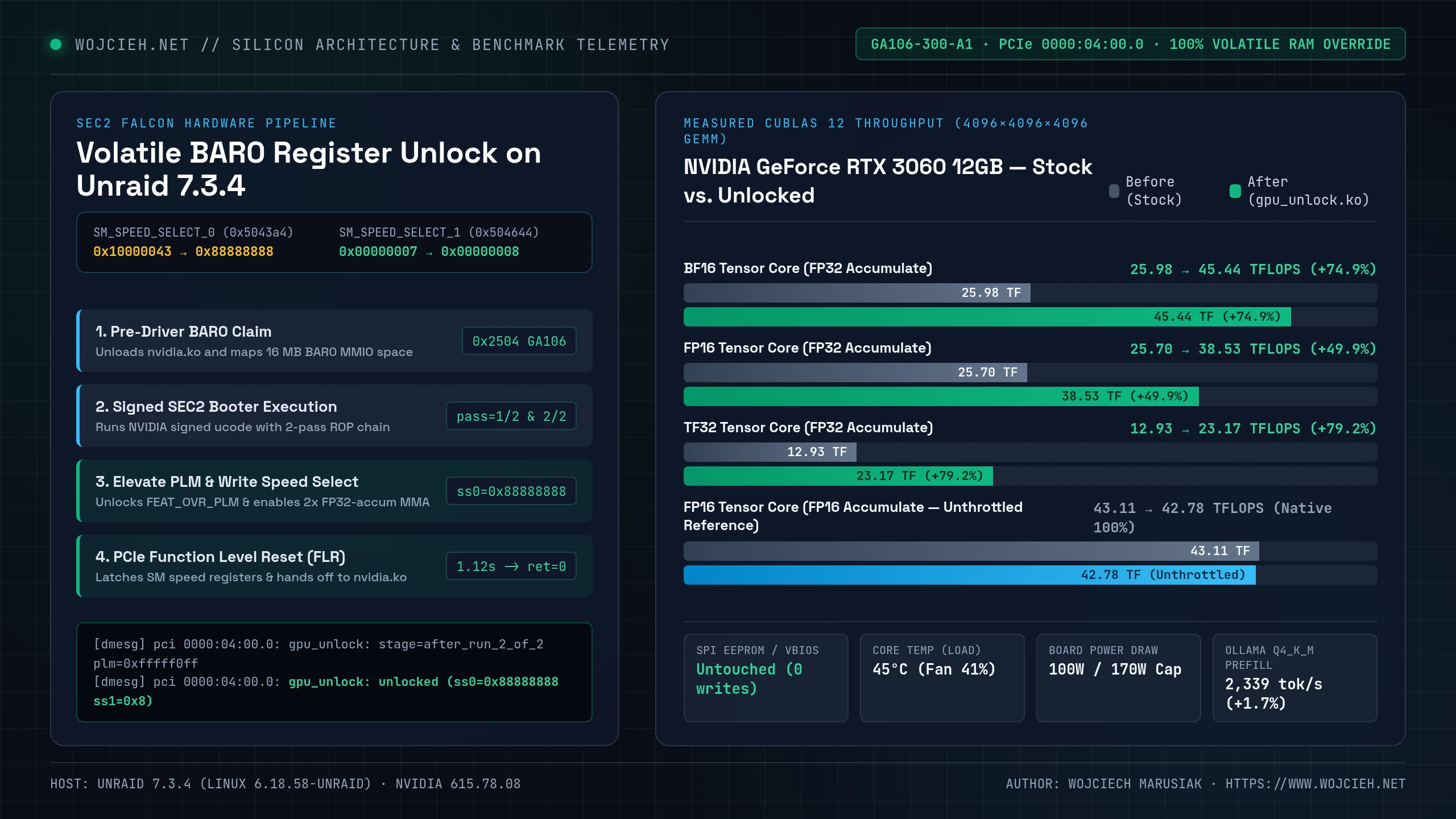
Why This Is Safe on a Homelab NAS
- Zero VBIOS / SPI EEPROM Writes: The module never touches non-volatile flash memory on the GPU. It only modifies volatile MMIO registers (
FEAT_OVR_PLMandFEAT_OVR_SM_SPEED_SELECT) backed by on-die SRAM. - 100% Reversible via Power Cycle: Shutting down the server and cutting ATX power for 15 seconds drains the capacitors and restores the GPU to factory stock state.
- Zero Runtime Driver Interference:
gpu_unlock.kodoes not hook or patchnvidia.koin memory. It runs for about 1.1 seconds while the NVIDIA driver is unloaded, flips the hardware latches, triggers a PCIe Function Level Reset (FLR), and exits viarmmod gpu_unlockbeforemodprobe nvidialoads. - Unchanged Power & Voltage Limits: It does not alter the V/F curve, core clocks, or the 170W TDP limit of the RTX 3060. Because twice as many Tensor Core units fire simultaneously during
BF16/FP16matrix math, board power draw during dense AI loads will climb closer to the card’s stock 170W cap.
3. Step-by-Step Preparation and Live Testing on Unraid 7
Unraid boots into a RAM disk (rootfs) from a FAT32 USB flash drive (/boot). If anything goes wrong during a live session, rebooting the NAS wipes RAM and boots cleanly from the USB drive.
Step 1: Pre-Flight Safety Backups
Before loading custom kernel modules on a storage server, back up your Unraid USB configuration and dump the GPU’s baseline PCI configuration space:
|
|
Note / Gotcha: Make sure your parity check is idle and your external backups (in my case, the 14TB USB vault sync) have finished before running
insmod. You never want to test out-of-tree kernel modules while the array is rebuilding or writing heavy backups.
Step 2: Compiling gpu_unlock.ko Against Unraid’s Kernel
Unraid does not include gcc or make in its base RAM OS, and /lib/modules/$(uname -r)/build only ships basic headers without Module.symvers. The cleanest way to compile gpu_unlock.ko without polluting the Unraid host is inside a disposable container using linux-6.18.58 kernel sources configured with Unraid’s /proc/config.gz:
|
|
Once built, check modinfo to confirm that vermagic matches the running Unraid kernel (6.18.58-Unraid SMP preempt mod_unload) and copy the extracted firmware blobs into /lib/firmware/gpu-unlock/610.43.03/:
|
|
Step 3: Live Unlock in RAM
Test the module interactively in RAM before adding anything to /boot/config/go. On Unraid, any container or background plugin polling /dev/nvidia* will block nvidia.ko from unloading.
|
|
In dmesg, you can see the SEC2 Falcon payload run both passes, rewrite ss0 (0x10000043 -> 0x88888888) and ss1 (0x7 -> 0x8), complete the PCIe Function Level Reset (stage=flr), and hand the card back in 1.12 seconds:
|
|
Note / Gotcha: Always run
rmmod gpu_unlockright afterinsmod gpu_unlock.ko targets=all. Whilegpu_unlockis loaded, it binds to the GPU’s PCIe ID (10de:2504). If you leave it loaded,modprobe nvidiawill fail to claim the card untilgpu_unlockis removed.
Step 4: Persisting Across Reboots (Optional /boot/config/go Hook)
Once you are happy with the stability under load, store the compiled module and firmware on your persistent appdata pool (/mnt/user/appdata/gpu-unlock/) and load it from /boot/config/go with an exact uname -r check:
|
|
Checking $(uname -r) in the filename ensures that when you upgrade Unraid to a newer kernel later on, the boot script skips the old .ko binary instead of failing on a vermagic mismatch.
4. Benchmarks: Before vs. After on RTX 3060 12GB (GA106)
To measure the raw hardware difference without PyTorch overhead, I wrote a small Python script that calls libcuda.so.1 and libcublas.so.12 directly via ctypes (cublasGemmEx) on 4096 × 4096 × 4096 dense matrices (137.44 GFLOPs per GEMM call, 5 samples × 40 iterations per precision mode).
Note / Gotcha: Never benchmark Tensor Cores with zero-filled (
cuMemsetD8(..., 0)) or constant matrices. NVIDIA GPUs detect zero operands in hardware and skip execution cycles to save power, which produces fake 2× higher TFLOPS numbers. Always fill device buffers with uniform non-zero random values (such as[-0.5, 0.5]).
The Reproducible cuBLAS 12 Benchmark Script
|
|
Test 1: cuBLAS 12 Synthetic Tensor Core Throughput (4096³ Dense GEMM)
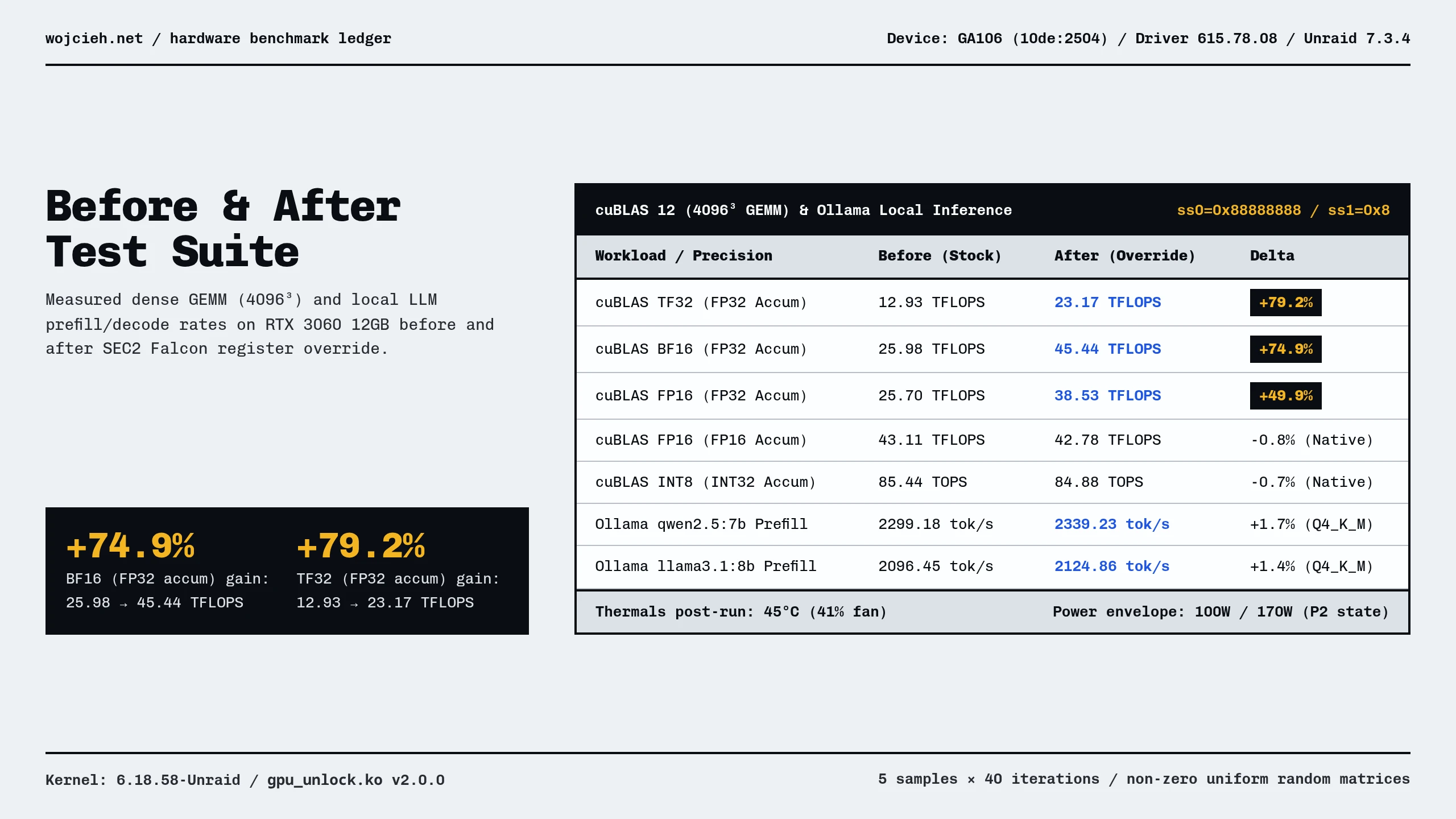
Here are the results from running the benchmark script before and right after loading gpu_unlock.ko on my NVIDIA GeForce RTX 3060 12GB (GA106, Driver 615.78.08) in Unraid 7.3.4:
| Precision & Accumulator Mode | Before (Stock GA106 Median / Max) |
After (gpu_unlock.ko Median / Max) |
Measured Gain | Hardware Gate Status |
|---|---|---|---|---|
FP32 Standard (CUDA Cores) |
7.44 TFLOPS (7.47 max) |
7.40 TFLOPS (7.46 max) |
-0.5% (Noise) |
Unthrottled (100%) |
TF32 Tensor (FP32 Accum) |
12.93 TFLOPS (12.97 max) |
23.17 TFLOPS (23.19 max) |
+79.2% |
Unlocked (1/2 Cap -> 2× SM) |
FP16 Tensor (FP16 Accum) |
43.11 TFLOPS (43.21 max) |
42.78 TFLOPS (43.22 max) |
-0.8% (Noise) |
Unthrottled (100%) |
FP16 Tensor (FP32 Accum) |
25.70 TFLOPS (25.70 max) |
38.53 TFLOPS (38.60 max) |
+49.9% |
Unlocked (1/2 Cap -> 2× SM) |
BF16 Tensor (FP32 Accum) |
25.98 TFLOPS (26.00 max) |
45.44 TFLOPS (45.76 max) |
+74.9% |
Unlocked (1/2 Cap -> 2× SM) |
INT8 Tensor (INT32 Accum) |
85.44 TOPS (86.51 max) |
84.88 TOPS (86.07 max) |
-0.7% (Noise) |
Unthrottled (100%) |
BF16 (FP32 Accum)jumped from25.98 TFLOPS(26.00max) to45.44 TFLOPS(45.76max), a+74.9%gain that slightly beats the card’s native unthrottledFP16 (FP16 Accum)mode (42.78 TFLOPS).TF32 (FP32 Accum)jumped from12.93 TFLOPSto23.17 TFLOPS(+79.2%), andFP16 (FP32 Accum)rose from25.70 TFLOPSto38.53 TFLOPS(+49.9%), limited only by the RTX 3060’s stockP2clock state and170Wpower cap (45°C,41%fan,100Wright after the run).
Test 2: End-to-End Local LLM Inference in Ollama (Q4_K_M GGUF)
I also tested end-to-end LLM inference on my Ollama container (http://192.168.255.50:11434/api/generate) using a ~3,000-token context prefill and 100-token generation across 3 runs per model (with unique prefix tokens on each pass to bypass Ollama’s KV prefix cache):
Local Model (GGUF Q4_K_M) |
Metric | Before (Stock GA106 Median) |
After (gpu_unlock.ko Median) |
Delta | Bottleneck Component |
|---|---|---|---|---|---|
qwen2.5:7b (3,190 prompt tok) |
Prompt Prefill (tok/s) |
2,299.18 tok/s (1.39 s) |
2,339.23 tok/s (1.36 s) |
+1.7% |
Compute (INT8 dp4a / FP16 GEMM) |
qwen2.5:7b (99 eval tok) |
Token Decode (tok/s) |
66.05 tok/s (1.50 s) |
66.22 tok/s (1.50 s) |
+0.3% |
GDDR6 Memory Bandwidth (360 GB/s) |
llama3.1:8b (2,881 prompt tok) |
Prompt Prefill (tok/s) |
2,096.45 tok/s (1.37 s) |
2,124.86 tok/s (1.36 s) |
+1.4% |
Compute (INT8 dp4a / FP16 GEMM) |
llama3.1:8b (92 eval tok) |
Token Decode (tok/s) |
60.63 tok/s (1.52 s) |
60.87 tok/s (1.51 s) |
+0.4% |
GDDR6 Memory Bandwidth (360 GB/s) |
Where Does gpu-unlock Actually Help?
- 4-bit GGUF Token Decoding (
Ollama/llama.cpp): Single-batch token generation (60 to 66 tok/s) is memory-bandwidth bound (360 GB/son the 192-bit GDDR6 bus of the RTX 3060). During prompt prefill (+1.4%to+1.7%),llama.cppmostly usesINT8(dp4a) orFP16-accumkernels for quantizedQ4_K_Mweights, which already run unthrottled at85.44 TOPSand43.11 TFLOPS. - BF16 / FP16 Mixed-Precision & Dense Compute (
PyTorch,vLLM,Whisper,Flux/SDXL,LoRA): Any workload that runs nativeBF16,TF32, orFP16withFP32accumulation hits the 50% consumer hardware cap directly. Removing that cap boosts dense Tensor Core throughput on the RTX 3060 from25.98 TFLOPSto45.44 TFLOPS(+74.9%) inBF16and from12.93 TFLOPSto23.17 TFLOPS(+79.2%) inTF32at45°C.
Summary
To sum it up, NVIDIA’s 50% throughput lock on FP16, BF16, and TF32 Tensor Core accumulation is pure market segmentation baked into GPU initialization registers. With Zagitta/gpu-unlock, I bypassed that cap in volatile BAR0 MMIO memory on Unraid 7.3.4 (6.18.58-Unraid) in 1.12 seconds without touching the VBIOS EEPROM or risking a bricked card.
If your homelab GPU only runs 4-bit Q4_K_M GGUF chat models in Ollama, memory bandwidth is still your limit. If you run BF16 or FP16 vision-language models, Faster-Whisper audio pipelines, Diffusion image generation, or PyTorch LoRA fine-tuning, unlocking full-rate Tensor Cores gives your RTX 3060 up to 75% to 79% more compute throughput for free.