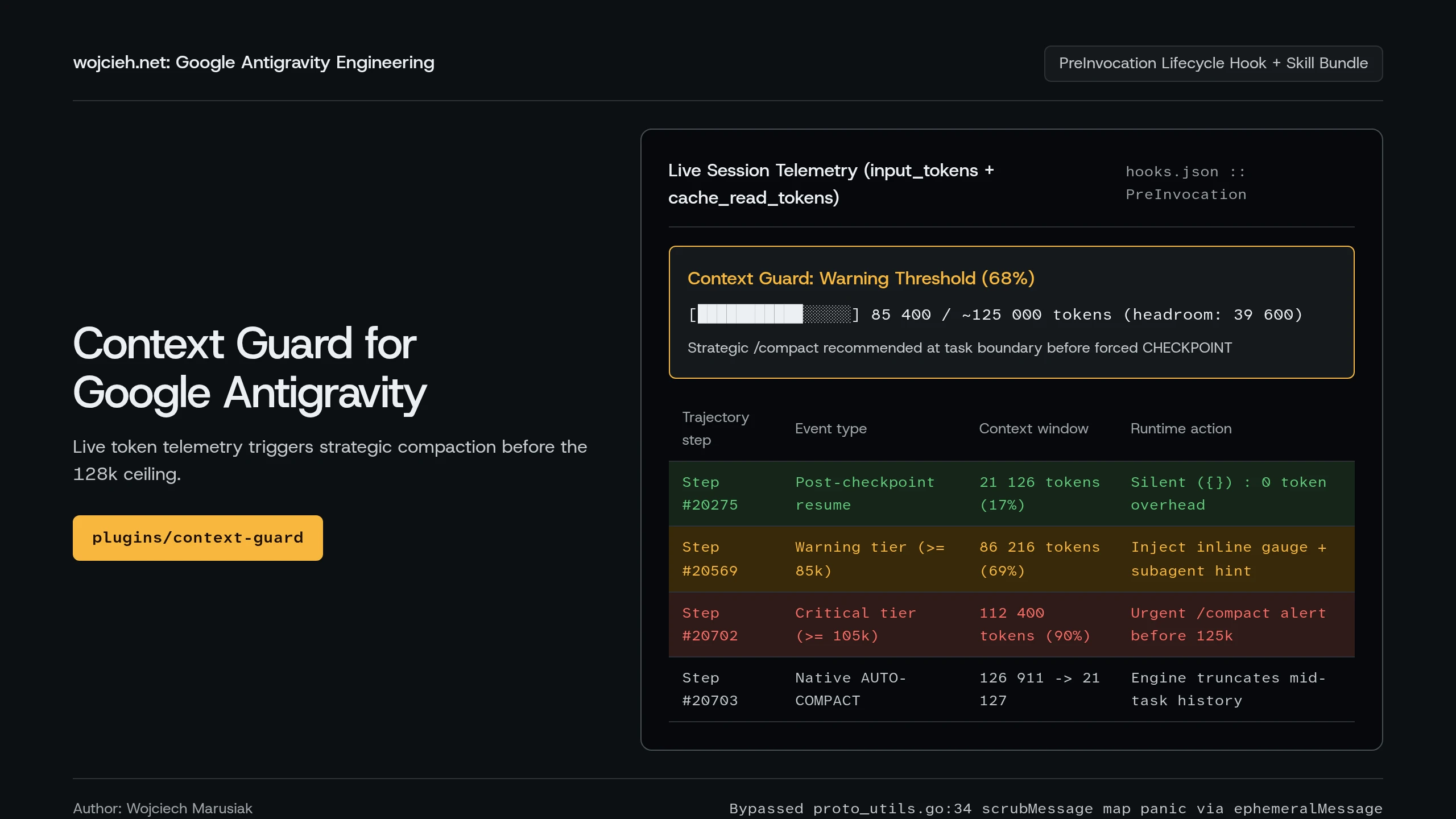
When you use Google Antigravity to run long infrastructure sessions across six MCP servers (managing Docker containers on MS-01, Unraid 7 ZFS pools, UniFi Wi-Fi channels, Pangolin tunnels, and Wazuh SIEM rules), a single chat thread quickly accumulates over 100,000 tokens of tool output. Eventually you hit the context ceiling, and the engine compacts the conversation right in the middle of a multi-step debugging loop.
In today’s post, I will show you how Antigravity’s native auto-compaction (CHECKPOINT) works under the hood based on raw transcript.jsonl telemetry, how I built and open-sourced the antigravity-context-guard plugin using PreInvocation lifecycle hooks, and how I tracked down a Go protobuf reflection panic inside language_server.log along the way.
1. How Google Antigravity Handles Auto-Compaction Under the Hood
Before writing any code, I wanted to verify whether Antigravity already compacts long sessions on its own and at what exact token count it fires. Every conversation in Antigravity writes a JSON Lines log at ~/.gemini/antigravity/brain/<conversation-id>/.system_generated/logs/transcript.jsonl.
Each PLANNER_RESPONSE step records three token counters for that model call:
input_tokens: fresh uncached tokens sent in the current step,cache_read_tokens: cached prefix tokens reused from prior turns,output_tokens: tokens generated by the model.
I ran a quick Python script against my longest homelab administration thread (20,900+ trajectory steps and 15 compactions) to inspect the active context size (input_tokens + cache_read_tokens) right before every CHECKPOINT event:
| Trajectory Step | Compaction Mode | Context Before (input + cache) |
Context Immediately After | Trigger Source |
|---|---|---|---|---|
Step #19796 |
MANUAL (/compact) |
89,334 tokens |
~21,000 tokens |
Manual /compact command |
Step #19929 |
AUTO-COMPACT |
127,548 tokens |
21,100 tokens |
Automatic mid-turn tool loop |
Step #20024 |
AUTO-COMPACT |
124,074 tokens |
21,050 tokens |
Automatic mid-turn tool loop |
Step #20274 |
AUTO-COMPACT |
127,400 tokens |
21,126 tokens |
Automatic after MCP dump |
Step #20293 |
AUTO-COMPACT |
126,522 tokens |
20,919 tokens |
Automatic on user prompt |
Step #20525 |
AUTO-COMPACT |
129,313 tokens |
21,127 tokens |
Automatic mid-task |
Three things stand out from the logs:
- The ~125k–128k Ceiling: As soon as
input_tokens + cache_read_tokenscrosses roughly 124,000 to 128,000 tokens ($2^{17} = 131,072$), Antigravity pauses execution, generates a structuredCHECKPOINTsummary, and truncates the earlier history. - Baseline Context Cost: Right after compaction, the session drops to ~21,000 tokens, which is the fixed footprint of the system prompt,
GEMINI.mdworkspace rules, and MCP tool declarations. - Why Native Auto-Compact Still Hurts: Because native auto-compaction fires strictly on token count, it often triggers in the middle of a 10-step debugging loop right after a large
docker logsorwazuh-logtestoutput. When that happens mid-task, the model keeps the high-level summary but loses fine details from the previous five tool calls.
In the Claude Code community, engineers solve this with the Strategic Compact pattern: instead of letting the runtime truncate your context at 128k mid-task, monitor the token counter and run /compact manually at logical task boundaries once you cross ~70% of the budget.
2. Designing the context-guard Plugin Architecture
Antigravity supports native Plugins (~/.gemini/config/plugins/<name>/) that bundle Lifecycle Hooks (hooks.json) and Skills (skills/<name>/SKILL.md) into a single toggleable package.
Here is the directory structure of antigravity-context-guard:
|
|

How the Threshold Tiers Work
- Optimal Tier (
< 85,000tokens /< 68%):context_monitor.pyoutputs{}and exits in under 5 milliseconds. Zero UI clutter and zero extra tokens in the conversation. - Warning Tier (
85,000 – 104,999tokens /68%–84%): Fires once at the start of a user turn (invocationNum <= 1), displays the inline🟡 Context Guardprogress bar at the top of the reply, and instructs the agent to delegate heavy log exploration to subagents (invoke_subagent, which run in isolated context windows). - Critical Tier (
>= 105,000tokens />= 84%): Displays the🔴 Context Guardcritical alert showing exact remaining token headroom (or overshoot) and advises running/compactas soon as the current response finishes.
3. Debugging a Go Protobuf Panic in language_server.log
When I wrote the first version of context_monitor.py, I used the systemMessage.metadata.user_markdown field from the hooks documentation to render a user-only UI banner:
|
|
The script ran and updated its state file in /tmp/agy-context-guard/, but nothing showed up in the chat UI. Digging into ~/.config/Antigravity/logs/language_server.log explained why:
|
|
Note / Gotcha: Inside Antigravity’s Go backend,
utils.scrubMessage(proto_utils.go:34) walks every field of the unmarshaled hook response to scrub sensitive strings before logging. When it encounters a non-empty Protobufmap<string, string>(likesystemMessage.metadata), itsmapReflect.Rangecallback callsval.Message()on the string map value and panics withcannot convert string to message. Do not passmetadatamaps inPreInvocationhook outputs until that bug is fixed upstream.
Switching the hook output from systemMessage.metadata to a plain string ephemeralMessage ({"injectSteps": [{"ephemeralMessage": "..."}]}) bypasses mapReflect.Range completely. Better yet, ephemeralMessage is dropped after the current turn, so it never adds permanent tokens to the trajectory.
4. Installation and Usage
I published the full plugin on GitHub (wojciehm/antigravity-context-guard) and Codeberg (wojcieh/antigravity-context-guard).
- Clone the repository directly into your global Antigravity plugins directory:
|
|
- Validate the plugin bundle using the Antigravity CLI:
|
|
|
|
- Restart Antigravity once so the runtime loads the new plugin. From then on,
PreInvocationmonitors your active sessions automatically, and you can also run/context-guardat any time to inspect live token telemetry and compaction history across your recent chats.
Summary
Having live visibility into input_tokens + cache_read_tokens changes how you manage long coding and homelab sessions. Instead of getting blindsided by an automatic CHECKPOINT halfway through debugging a Traefik mTLS route or a Wazuh decoder, context-guard warns me right when a thread hits 68% capacity so I can finish the current step and run /compact on my own terms.