---
title: "Unable to update vCSA 6.5 to 6.7 – quick fix"
date: "2018-10-17T07:00:57Z"
tags: ["vCenter Server"]
categories: ["Blog & Other"]
---
 I am quite busy with keeping my Homelab up to date and I faced strange issue with upgrading vCenter Server Appliance 6.5 to 6.7. The fix is rather easy but let's identify the issues first.
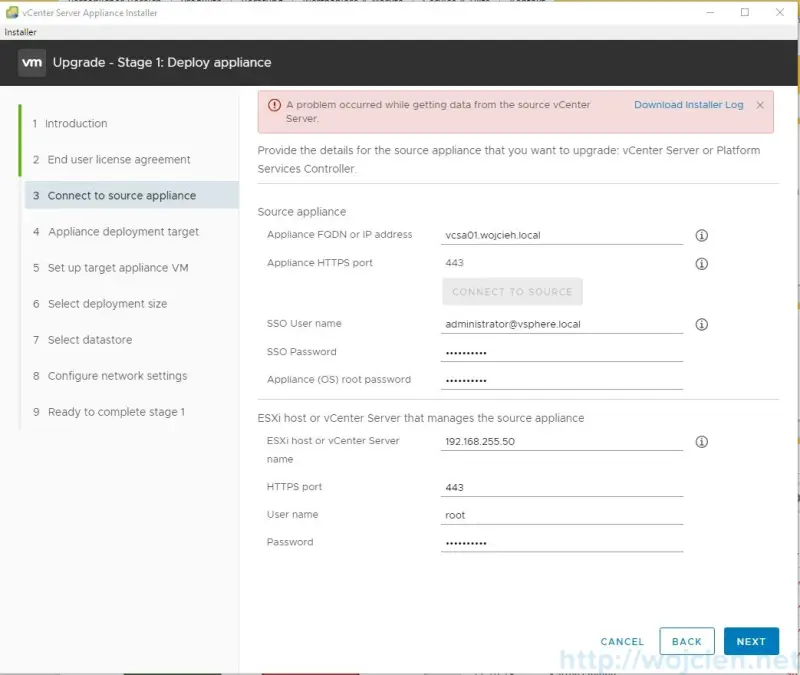
The first error I noticed was in the vCenter Server Appliance 6.7 Installer.
I am quite busy with keeping my Homelab up to date and I faced strange issue with upgrading vCenter Server Appliance 6.5 to 6.7. The fix is rather easy but let's identify the issues first.
The first error I noticed was in the vCenter Server Appliance 6.7 Installer.
 Here is the installer log.
```bash
2018-10-12T14:31:24.377Z - info: installerLogFile: C:\Users\wojcieh\AppData\Local\Temp\vcsaUiInstaller\installer-20181012-163124372.log
2018-10-12T14:31:24.389Z - info: networkLogFile: C:\Users\wojcieh\AppData\Local\Temp\vcsaUiInstaller\network-20181012-163124372.log
2018-10-12T14:31:24.532Z - debug: wizardTitle: - Stage[1]: Deploy appliance
2018-10-12T14:31:29.639Z - debug: wizardTitle: Upgrade - Stage[1]: Deploy appliance
2018-10-12T14:34:17.291Z - debug: wizardTitle: Upgrade - Stage[1]: Deploy appliance
2018-10-12T14:34:28.653Z - info: getDeploymentType() on source VC:vcsa01.wojcieh.local
2018-10-12T14:34:28.654Z - info: initializing vsphere API connection to vcsa01.wojcieh.local:443
2018-10-12T14:34:28.665Z - info: getDeploymentType() on source VC:vcsa01.wojcieh.local
2018-10-12T14:34:28.665Z - info: initializing vsphere API connection to vcsa01.wojcieh.local:443
2018-10-12T14:34:28.772Z - info: getDeploymentType() on source VC:vcsa01.wojcieh.local
2018-10-12T14:34:28.772Z - info: initializing vsphere API connection to vcsa01.wojcieh.local:443
2018-10-12T14:34:31.254Z - info: vimService apiType: VirtualCenter, version: 6.5.0
2018-10-12T14:34:31.312Z - info: vimService apiType: VirtualCenter, version: 6.5.0
2018-10-12T14:34:31.367Z - info: vimService apiType: VirtualCenter, version: 6.5.0
2018-10-12T14:34:31.385Z - debug: session does not exist: vcsa01.wojcieh.local,
2018-10-12T14:34:31.385Z - debug: Logging in to vcsa01.wojcieh.local:443 as
2018-10-12T14:34:31.396Z - debug: session does not exist: vcsa01.wojcieh.local,
2018-10-12T14:34:31.397Z - debug: Logging in to vcsa01.wojcieh.local:443 as
2018-10-12T14:34:31.412Z - debug: session does not exist: vcsa01.wojcieh.local,
2018-10-12T14:34:31.412Z - debug: Logging in to vcsa01.wojcieh.local:443 as
2018-10-12T14:34:35.434Z - error: Failed to login to vcsa01.wojcieh.local:443 as : ServerFaultCode: Cannot complete login due to an incorrect user name or password.
2018-10-12T14:34:36.416Z - error: Failed to login to vcsa01.wojcieh.local:443 as : ServerFaultCode: Cannot complete login due to an incorrect user name or password.
2018-10-12T14:34:36.431Z - error: Failed to login to vcsa01.wojcieh.local:443 as : ServerFaultCode: Cannot complete login due to an incorrect user name or password.
2018-10-12T14:34:46.176Z - debug: Source Host IP address in DOM input value is: 192.168.255.50
2018-10-12T14:34:46.176Z - debug: Source Host IP Value in data model is: 192.168.255.50
2018-10-12T14:34:46.176Z - debug: Source Host IP Value in data model after correction is: 192.168.255.50
2018-10-12T16:00:02.053Z - info: THUMBPRINT(vCenterAppliance): D6:9C:61:5C:25:16:ED:5D:9E:43:02:7C:9C:29:0E:C1:36:7B:BA:B7
2018-10-12T16:00:02.077Z - info: THUMBPRINT(esxiHost): 17:1C:8C:B6:04:2D:FA:35:BA:27:C0:73:8D:36:BE:C4:FF:A5:80:64
2018-10-12T16:00:03.289Z - info: attemptHttpsConnToSourceVc
2018-10-12T16:00:03.351Z - info: login() to source VC:vcsa01.wojcieh.local
2018-10-12T16:00:03.352Z - info: initializing vsphere API connection to vcsa01.wojcieh.local:443
2018-10-12T16:00:04.389Z - info: vimService apiType: VirtualCenter, version: 6.5.0
2018-10-12T16:00:04.433Z - debug: session does not exist: vcsa01.wojcieh.local, administrator@vsphere.local
2018-10-12T16:00:04.434Z - debug: Logging in to vcsa01.wojcieh.local:443 as administrator@vsphere.local
2018-10-12T16:00:04.608Z - info: Logged in to vcsa01.wojcieh.local:443 as administrator@vsphere.local, session: 52b64c24-6604-0973-796e-636e9373aeda
2018-10-12T16:00:04.609Z - info: Login successful to source VC, IP: vcsa01.wojcieh.local
2018-10-12T16:00:04.609Z - info: login() to host managing the source VC:192.168.255.50
2018-10-12T16:00:04.609Z - info: initializing vsphere API connection to 192.168.255.50:443
2018-10-12T16:00:05.459Z - info: vimService apiType: HostAgent, version: 6.7.0
2018-10-12T16:00:05.488Z - debug: session does not exist: 192.168.255.50, root
2018-10-12T16:00:05.488Z - debug: Logging in to 192.168.255.50:443 as root
2018-10-12T16:00:05.528Z - info: Logged in to 192.168.255.50:443 as root, session: 52d39798-8193-779e-cd9a-b0379926c102
2018-10-12T16:00:05.528Z - info: Login successful to host for source VC, IP: 192.168.255.50:443
2018-10-12T16:00:05.528Z - info: sourceVcService: Source VC Version=6.5, minVersion=6, maxVersion=6.7
2018-10-12T16:00:05.529Z - info: Source VC, version: 6.5.0, isOSLinux: true
2018-10-12T16:00:05.529Z - debug: isIp: vcsa01.wojcieh.local: false
2018-10-12T16:00:05.578Z - debug: vcsa01.wojcieh.local: dnsResolve result for IPv4 : undefined
2018-10-12T16:00:05.579Z - warn: DNS is not resolved to IPv4: Error: queryA ENOTFOUND vcsa01.wojcieh.local
2018-10-12T16:00:05.581Z - debug: vcsa01.wojcieh.local: dnsResolve result for IPv6 : undefined
2018-10-12T16:00:05.581Z - warn: DNS is not resolved to IPv6: Error: queryAaaa ENOTFOUND vcsa01.wojcieh.local
2018-10-12T16:00:05.582Z - debug: getVmWithIPFQDN: hostName vcsa01.wojcieh.local is associated with []
2018-10-12T16:00:05.583Z - debug: ips associated with vcsa01.wojcieh.local: []
2018-10-12T16:00:06.009Z - debug: token:undefined, length:25, running total:25
2018-10-12T16:00:06.010Z - debug: vm found by hostName: vcsa01.wojcieh.local
2018-10-12T16:00:06.012Z - info: VM with hostName vcsa01.wojcieh.local: { _type: 'VirtualMachine',
_moid: '131',
config: { template: false },
guest:
{ hostName: 'vcsa01.wojcieh.local',
ipAddress: '10.0.0.9',
net: [ [Object] ] },
name: 'vcsa01-Clone-2018-09-18 21-33',
summary:
{ storage:
{ committed: 34364994727,
uncommitted: 223183116382,
unshared: 34364994727,
timestamp: 2018-10-12T15:29:50.103Z } } }
2018-10-12T16:00:06.012Z - info: VM Identifier for Source VC: 131
2018-10-12T16:00:06.141Z - debug: initiateFileTransferFromGuest error: ServerFaultCode: Failed to authenticate with the guest operating system using the supplied credentials.
2018-10-12T16:00:06.141Z - debug: Failed to get fileTransferInfo:ServerFaultCode: Failed to authenticate with the guest operating system using the supplied credentials.
2018-10-12T16:00:06.141Z - debug: Failed to get url of file in guest vm:ServerFaultCode: Failed to authenticate with the guest operating system using the supplied credentials.
2018-10-12T16:00:06.142Z - error: Error in getting fileData for nodeType. Error: ServerFaultCode: Failed to authenticate with the guest operating system using the supplied credentials.
2018-10-12T16:00:06.142Z - error: Failed to read the nodetype, Error: Failed to authenticate with the guest operating system using the supplied credentials.
2018-10-12T16:00:06.142Z - info: Checking if password expired
2018-10-12T16:00:07.506Z - info: Banner from server,
VMware vCenter Server Appliance 6.5.0.10000
Type: vCenter Server with an embedded Platform Services Controller
2018-10-12T16:00:07.507Z - info: Connection ready
2018-10-12T16:00:07.521Z - info: STDOUT: date
exit
2018-10-12T16:00:07.989Z - info: STDOUT: Connected to service
2018-10-12T16:00:08.013Z - info: STDOUT:
* List APIs: "help api list"
* List Plugins: "help pi list"
* Launch BASH: "shell"
2018-10-12T16:00:08.021Z - info: STDOUT: Command<
2018-10-12T16:00:08.022Z - info: STDOUT: d
2018-10-12T16:00:08.023Z - info: STDOUT: a
2018-10-12T16:00:08.023Z - info: STDOUT: t
2018-10-12T16:00:08.023Z - info: STDOUT: e
2018-10-12T16:00:08.023Z - info: STDOUT:
2018-10-12T16:00:08.041Z - info: STDOUT: Unknown command: `date'
2018-10-12T16:00:08.042Z - info: STDOUT: Command<
2018-10-12T16:00:08.042Z - info: STDOUT: e
2018-10-12T16:00:08.043Z - info: STDOUT: x
2018-10-12T16:00:08.043Z - info: STDOUT: i
2018-10-12T16:00:08.043Z - info: STDOUT: t
2018-10-12T16:00:08.044Z - info: STDOUT:
2018-10-12T16:00:08.134Z - info: Stream :: close
2018-10-12T16:00:08.134Z - info: Password not expired
2018-10-12T16:00:08.136Z - error: sourcePrecheck: error in getting source Info: ServerFaultCode: Failed to authenticate with the guest operating system using the supplied credentials.
2018-10-12T16:00:08.136Z - info: VCHA is not enabled on the source host
2018-10-12T16:02:04.510Z - info: Log file was saved at: D:\Download\installer-20181012-163124372.log
```
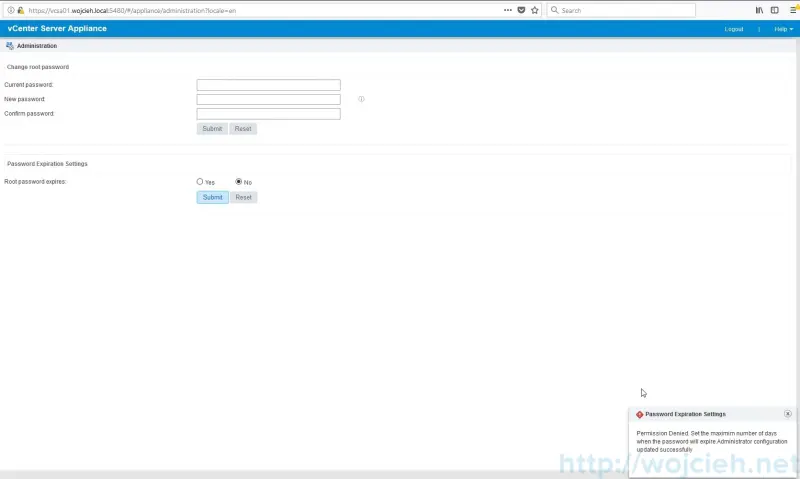
I checked and I was able to login with my ssh password to vCenter Server Appliance. I wasn't able to disable root password expiration or even to change the password.
```bash
Permission Denied. Set the maximim number of days when the password will expire.Administrator configuration updated successfully
```
Here is the installer log.
```bash
2018-10-12T14:31:24.377Z - info: installerLogFile: C:\Users\wojcieh\AppData\Local\Temp\vcsaUiInstaller\installer-20181012-163124372.log
2018-10-12T14:31:24.389Z - info: networkLogFile: C:\Users\wojcieh\AppData\Local\Temp\vcsaUiInstaller\network-20181012-163124372.log
2018-10-12T14:31:24.532Z - debug: wizardTitle: - Stage[1]: Deploy appliance
2018-10-12T14:31:29.639Z - debug: wizardTitle: Upgrade - Stage[1]: Deploy appliance
2018-10-12T14:34:17.291Z - debug: wizardTitle: Upgrade - Stage[1]: Deploy appliance
2018-10-12T14:34:28.653Z - info: getDeploymentType() on source VC:vcsa01.wojcieh.local
2018-10-12T14:34:28.654Z - info: initializing vsphere API connection to vcsa01.wojcieh.local:443
2018-10-12T14:34:28.665Z - info: getDeploymentType() on source VC:vcsa01.wojcieh.local
2018-10-12T14:34:28.665Z - info: initializing vsphere API connection to vcsa01.wojcieh.local:443
2018-10-12T14:34:28.772Z - info: getDeploymentType() on source VC:vcsa01.wojcieh.local
2018-10-12T14:34:28.772Z - info: initializing vsphere API connection to vcsa01.wojcieh.local:443
2018-10-12T14:34:31.254Z - info: vimService apiType: VirtualCenter, version: 6.5.0
2018-10-12T14:34:31.312Z - info: vimService apiType: VirtualCenter, version: 6.5.0
2018-10-12T14:34:31.367Z - info: vimService apiType: VirtualCenter, version: 6.5.0
2018-10-12T14:34:31.385Z - debug: session does not exist: vcsa01.wojcieh.local,
2018-10-12T14:34:31.385Z - debug: Logging in to vcsa01.wojcieh.local:443 as
2018-10-12T14:34:31.396Z - debug: session does not exist: vcsa01.wojcieh.local,
2018-10-12T14:34:31.397Z - debug: Logging in to vcsa01.wojcieh.local:443 as
2018-10-12T14:34:31.412Z - debug: session does not exist: vcsa01.wojcieh.local,
2018-10-12T14:34:31.412Z - debug: Logging in to vcsa01.wojcieh.local:443 as
2018-10-12T14:34:35.434Z - error: Failed to login to vcsa01.wojcieh.local:443 as : ServerFaultCode: Cannot complete login due to an incorrect user name or password.
2018-10-12T14:34:36.416Z - error: Failed to login to vcsa01.wojcieh.local:443 as : ServerFaultCode: Cannot complete login due to an incorrect user name or password.
2018-10-12T14:34:36.431Z - error: Failed to login to vcsa01.wojcieh.local:443 as : ServerFaultCode: Cannot complete login due to an incorrect user name or password.
2018-10-12T14:34:46.176Z - debug: Source Host IP address in DOM input value is: 192.168.255.50
2018-10-12T14:34:46.176Z - debug: Source Host IP Value in data model is: 192.168.255.50
2018-10-12T14:34:46.176Z - debug: Source Host IP Value in data model after correction is: 192.168.255.50
2018-10-12T16:00:02.053Z - info: THUMBPRINT(vCenterAppliance): D6:9C:61:5C:25:16:ED:5D:9E:43:02:7C:9C:29:0E:C1:36:7B:BA:B7
2018-10-12T16:00:02.077Z - info: THUMBPRINT(esxiHost): 17:1C:8C:B6:04:2D:FA:35:BA:27:C0:73:8D:36:BE:C4:FF:A5:80:64
2018-10-12T16:00:03.289Z - info: attemptHttpsConnToSourceVc
2018-10-12T16:00:03.351Z - info: login() to source VC:vcsa01.wojcieh.local
2018-10-12T16:00:03.352Z - info: initializing vsphere API connection to vcsa01.wojcieh.local:443
2018-10-12T16:00:04.389Z - info: vimService apiType: VirtualCenter, version: 6.5.0
2018-10-12T16:00:04.433Z - debug: session does not exist: vcsa01.wojcieh.local, administrator@vsphere.local
2018-10-12T16:00:04.434Z - debug: Logging in to vcsa01.wojcieh.local:443 as administrator@vsphere.local
2018-10-12T16:00:04.608Z - info: Logged in to vcsa01.wojcieh.local:443 as administrator@vsphere.local, session: 52b64c24-6604-0973-796e-636e9373aeda
2018-10-12T16:00:04.609Z - info: Login successful to source VC, IP: vcsa01.wojcieh.local
2018-10-12T16:00:04.609Z - info: login() to host managing the source VC:192.168.255.50
2018-10-12T16:00:04.609Z - info: initializing vsphere API connection to 192.168.255.50:443
2018-10-12T16:00:05.459Z - info: vimService apiType: HostAgent, version: 6.7.0
2018-10-12T16:00:05.488Z - debug: session does not exist: 192.168.255.50, root
2018-10-12T16:00:05.488Z - debug: Logging in to 192.168.255.50:443 as root
2018-10-12T16:00:05.528Z - info: Logged in to 192.168.255.50:443 as root, session: 52d39798-8193-779e-cd9a-b0379926c102
2018-10-12T16:00:05.528Z - info: Login successful to host for source VC, IP: 192.168.255.50:443
2018-10-12T16:00:05.528Z - info: sourceVcService: Source VC Version=6.5, minVersion=6, maxVersion=6.7
2018-10-12T16:00:05.529Z - info: Source VC, version: 6.5.0, isOSLinux: true
2018-10-12T16:00:05.529Z - debug: isIp: vcsa01.wojcieh.local: false
2018-10-12T16:00:05.578Z - debug: vcsa01.wojcieh.local: dnsResolve result for IPv4 : undefined
2018-10-12T16:00:05.579Z - warn: DNS is not resolved to IPv4: Error: queryA ENOTFOUND vcsa01.wojcieh.local
2018-10-12T16:00:05.581Z - debug: vcsa01.wojcieh.local: dnsResolve result for IPv6 : undefined
2018-10-12T16:00:05.581Z - warn: DNS is not resolved to IPv6: Error: queryAaaa ENOTFOUND vcsa01.wojcieh.local
2018-10-12T16:00:05.582Z - debug: getVmWithIPFQDN: hostName vcsa01.wojcieh.local is associated with []
2018-10-12T16:00:05.583Z - debug: ips associated with vcsa01.wojcieh.local: []
2018-10-12T16:00:06.009Z - debug: token:undefined, length:25, running total:25
2018-10-12T16:00:06.010Z - debug: vm found by hostName: vcsa01.wojcieh.local
2018-10-12T16:00:06.012Z - info: VM with hostName vcsa01.wojcieh.local: { _type: 'VirtualMachine',
_moid: '131',
config: { template: false },
guest:
{ hostName: 'vcsa01.wojcieh.local',
ipAddress: '10.0.0.9',
net: [ [Object] ] },
name: 'vcsa01-Clone-2018-09-18 21-33',
summary:
{ storage:
{ committed: 34364994727,
uncommitted: 223183116382,
unshared: 34364994727,
timestamp: 2018-10-12T15:29:50.103Z } } }
2018-10-12T16:00:06.012Z - info: VM Identifier for Source VC: 131
2018-10-12T16:00:06.141Z - debug: initiateFileTransferFromGuest error: ServerFaultCode: Failed to authenticate with the guest operating system using the supplied credentials.
2018-10-12T16:00:06.141Z - debug: Failed to get fileTransferInfo:ServerFaultCode: Failed to authenticate with the guest operating system using the supplied credentials.
2018-10-12T16:00:06.141Z - debug: Failed to get url of file in guest vm:ServerFaultCode: Failed to authenticate with the guest operating system using the supplied credentials.
2018-10-12T16:00:06.142Z - error: Error in getting fileData for nodeType. Error: ServerFaultCode: Failed to authenticate with the guest operating system using the supplied credentials.
2018-10-12T16:00:06.142Z - error: Failed to read the nodetype, Error: Failed to authenticate with the guest operating system using the supplied credentials.
2018-10-12T16:00:06.142Z - info: Checking if password expired
2018-10-12T16:00:07.506Z - info: Banner from server,
VMware vCenter Server Appliance 6.5.0.10000
Type: vCenter Server with an embedded Platform Services Controller
2018-10-12T16:00:07.507Z - info: Connection ready
2018-10-12T16:00:07.521Z - info: STDOUT: date
exit
2018-10-12T16:00:07.989Z - info: STDOUT: Connected to service
2018-10-12T16:00:08.013Z - info: STDOUT:
* List APIs: "help api list"
* List Plugins: "help pi list"
* Launch BASH: "shell"
2018-10-12T16:00:08.021Z - info: STDOUT: Command<
2018-10-12T16:00:08.022Z - info: STDOUT: d
2018-10-12T16:00:08.023Z - info: STDOUT: a
2018-10-12T16:00:08.023Z - info: STDOUT: t
2018-10-12T16:00:08.023Z - info: STDOUT: e
2018-10-12T16:00:08.023Z - info: STDOUT:
2018-10-12T16:00:08.041Z - info: STDOUT: Unknown command: `date'
2018-10-12T16:00:08.042Z - info: STDOUT: Command<
2018-10-12T16:00:08.042Z - info: STDOUT: e
2018-10-12T16:00:08.043Z - info: STDOUT: x
2018-10-12T16:00:08.043Z - info: STDOUT: i
2018-10-12T16:00:08.043Z - info: STDOUT: t
2018-10-12T16:00:08.044Z - info: STDOUT:
2018-10-12T16:00:08.134Z - info: Stream :: close
2018-10-12T16:00:08.134Z - info: Password not expired
2018-10-12T16:00:08.136Z - error: sourcePrecheck: error in getting source Info: ServerFaultCode: Failed to authenticate with the guest operating system using the supplied credentials.
2018-10-12T16:00:08.136Z - info: VCHA is not enabled on the source host
2018-10-12T16:02:04.510Z - info: Log file was saved at: D:\Download\installer-20181012-163124372.log
```
I checked and I was able to login with my ssh password to vCenter Server Appliance. I wasn't able to disable root password expiration or even to change the password.
```bash
Permission Denied. Set the maximim number of days when the password will expire.Administrator configuration updated successfully
```
 # Solution
In order to fix the issue, I logged in to vCSA via SSH and changed the password.
# Solution
In order to fix the issue, I logged in to vCSA via SSH and changed the password.
 Once the password was changed the vCenter Server Appliance Installer was able to move to the next step.